
Logging a borehole
Add a borehole
Record the hole itself: its type, date, position and depth, and why it ended.
On this page
On a project, press Add borehole. The form is called New borehole.
The fields
| Field | Notes |
|---|---|
| Date drilled | The day you drilled the hole. |
| Hole type | Flight auger, wash bore, core, test pit, push tube or hand auger. |
| Equipment | For example, truck-mounted auger. |
| Bucket size (mm) | The size of the bucket or auger, in millimetres. |
| Easting, Northing | The position of the hole. |
| Reduced level (m) | Optional. The ground level. |
| Final depth (m) | Optional. Fill it in when you finish. |
| Water at (m) | Optional. The depth where you met water. |
| Ended because | Terminated or Refusal. |
| Notes | Optional. |
Press Add borehole. The new hole opens.
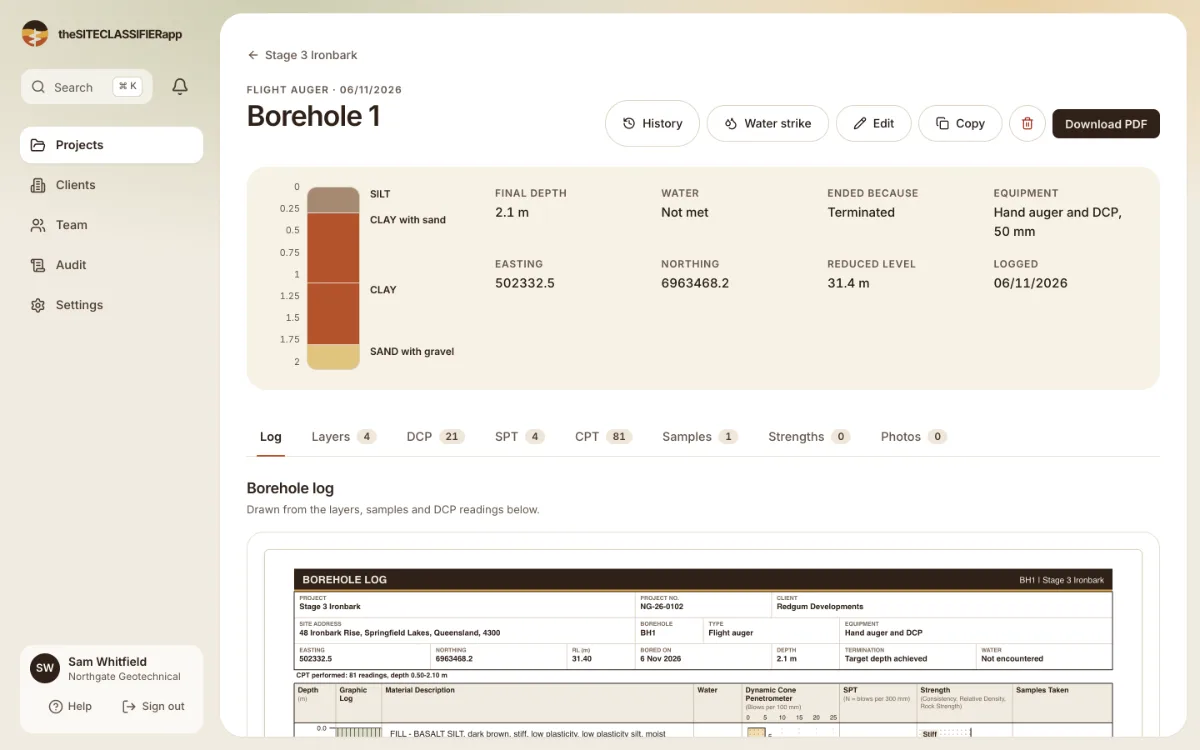
The tabs are Log, Layers, DCP, SPT, CPT, Samples, Strengths and Photos.
Water
If you meet water later, press Water strike at the top of the borehole.
Edit the hole
Press Edit at the top of the borehole. Change a value and save.
Was this helpful?
Still stuck?
Tell us what happened. We will see which article you were reading.