
Getting started
The main screens
A short tour of Projects, Clients, Team, Audit and Settings, and of the project and borehole screens.
The side menu has these places. On a phone browser it opens from the menu button.
| Screen | What it is for |
|---|---|
| Projects | Every job. Search and filter here. Make a New project. |
| Clients | The builders and developers you drill for. |
| Team | The people in your company, their roles, and invites that wait. |
| Audit | A record of who changed what. Admins only. |
| Settings | Your profile, field mode, and for admins the company name and logo. |
The Search box at the top of the menu finds projects and more. You can also press ⌘ K (or Ctrl K). The bell shows handovers and sign-offs.
Inside a project
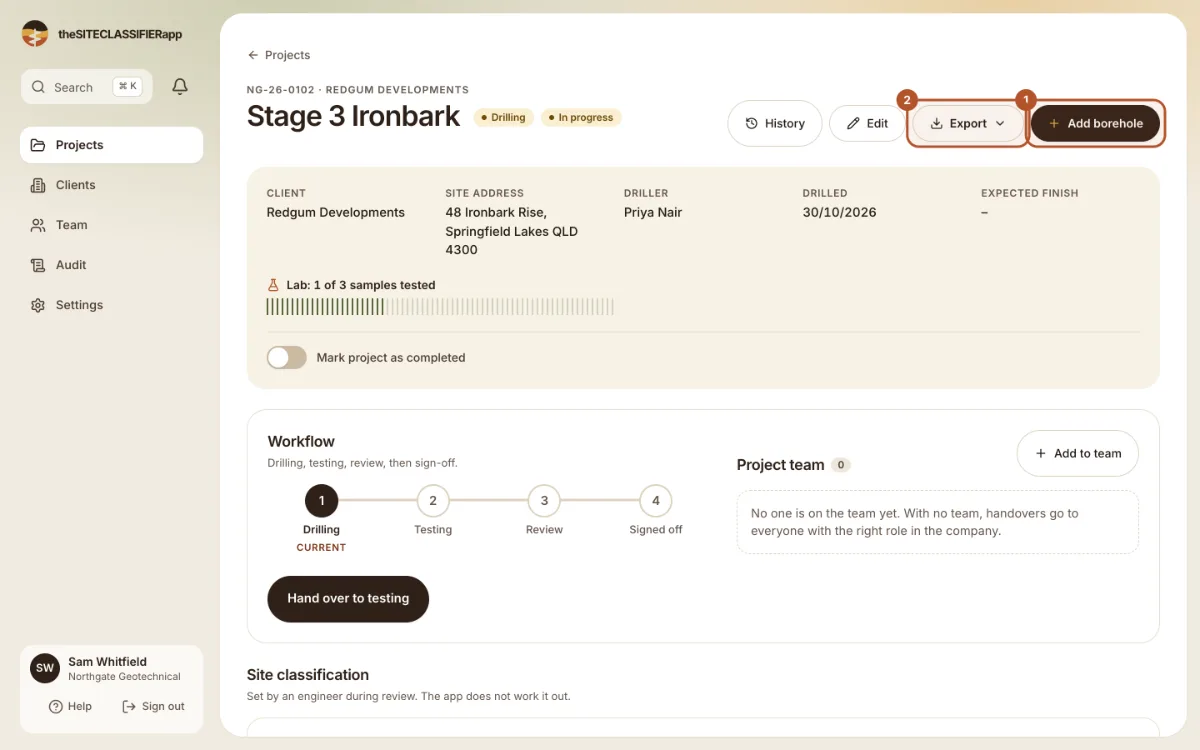
A project has the tabs Boreholes, Site information, Samples, Lab and Photos. The Workflow panel shows the four steps. Export has the PDFs and files.
Inside a borehole
A borehole has the tabs Log, Layers, DCP, SPT, CPT, Samples, Strengths and Photos. Download PDF is at the top.
Was this helpful?
Still stuck?
Tell us what happened. We will see which article you were reading.