
Site classification
Who sets the site class
The app does not work out the site class. An engineer chooses the class in Review and writes the reason.
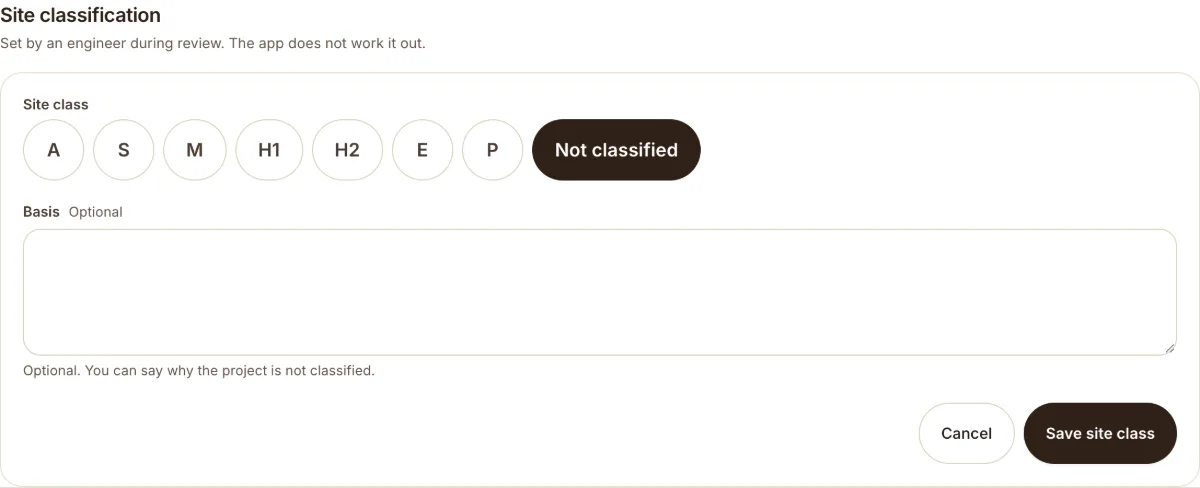
The app does not work out the site class. An engineer (or admin) enters it. The card on the project says it too: "Set by an engineer during review. The app does not work it out."

Who and when
Only an engineer or admin can set the class, and only while the project is in Review.
Set the class
- Open the project in Review.
- On the site classification card, press Set class.
- Choose the class: A, S, M, H1, H2, E, P, or Not classified.
- Write the basis: why you chose that class. A class needs a basis.
- Press Save site class.
What the app gives you
- A place to record the site information.
- Borehole logs, DCP, SPT and CPT results, samples and lab results.
- PDFs with the class and the basis once they are saved.
What the app does not give you
- It does not work out the class from your data.
- It does not make a classification certificate.
- It does not replace the engineer, or the lab results.
If you try to sign off with no class, the app warns you. You can still sign off, for example when the job needs no class. See Sign off and reopen.
Was this helpful?
Still stuck?
Tell us what happened. We will see which article you were reading.