
Projects and workflow
Sign off and reopen a project
An engineer signs off when the records are final. Sign-off locks the project. Only an engineer or admin can reopen it, with a reason.
On this page
Only an engineer or admin can sign off or reopen.
Sign off
- The project must be in Review. See The project workflow.
- Set the site class first if you have one. See Who sets the site class.
- Press Sign off.
- The box shows the name on the stamp, the date and the version. If the project has no site class, it warns you.
- Press Sign off and lock.
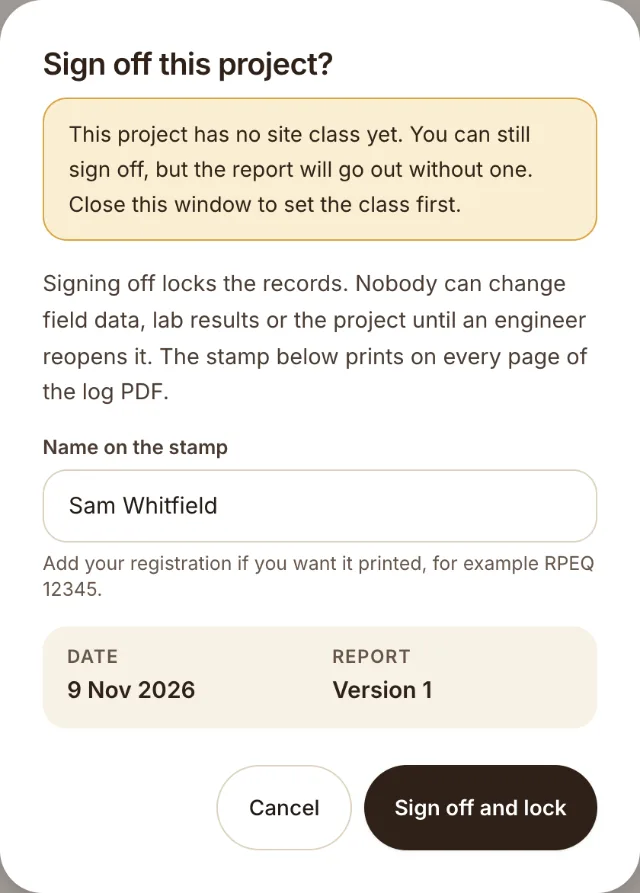
After sign-off the step is Signed off. The PDFs carry the sign-off stamp. Nobody can change the project, its boreholes, samples or lab results.
Reopen
- Press Reopen.
- Write the reason. It must be at least 10 characters.
- Press Reopen project.
The project goes back to work. The next sign-off gets a higher version number on the stamp. The reason is kept in the audit log.
Why it locks
A signed record must not change quietly. If a number must change, an engineer reopens the project, and the reason and the new version show who did it and when.
Was this helpful?
Still stuck?
Tell us what happened. We will see which article you were reading.