
Account and sign-in
Your company logo on PDF logs
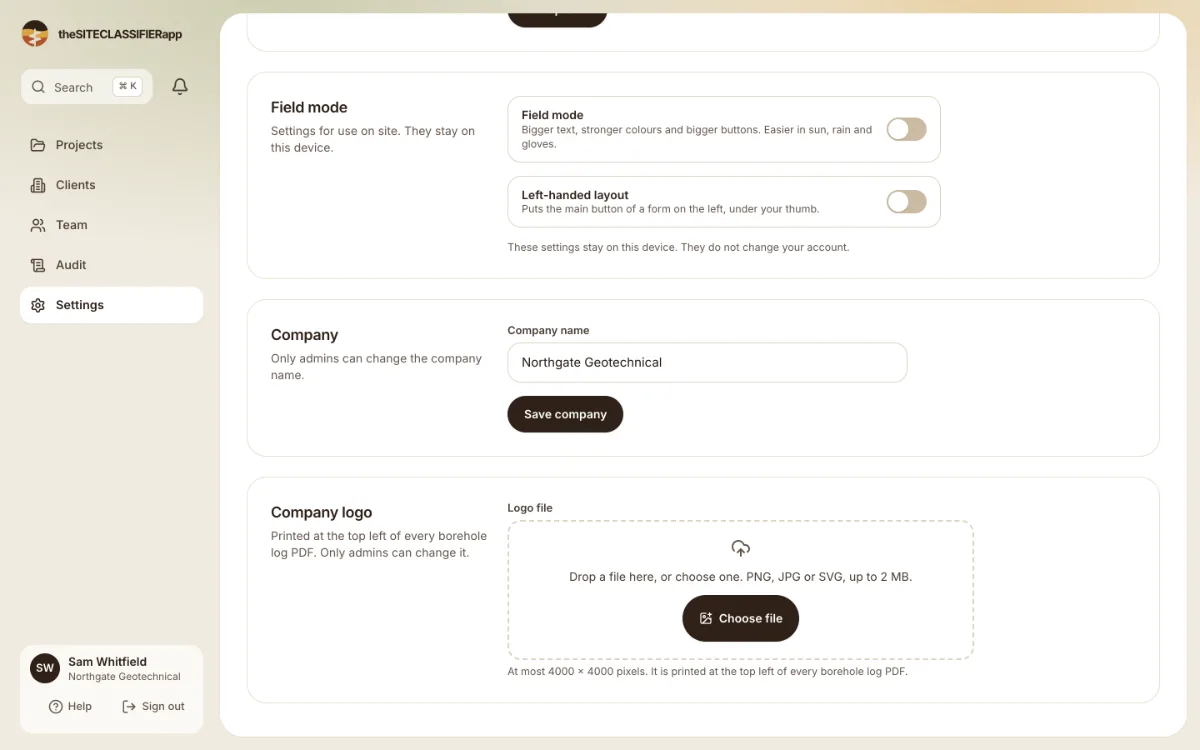
Admins can add a logo. It prints at the top left of every borehole log PDF.
Only an admin can add or change the logo.
Add a logo
- Open Settings. Find Company logo.
- Drop a file on the box, or choose one. It must be a PNG, JPG or SVG picture, up to 2 MB, and at most 4000 x 4000 pixels.
- The app checks the file and shows the logo on a light ground and on a dark ground. Look at both.
Replace or remove it
Press Replace the logo to choose another file. To remove it, use the remove button. The app asks "Remove the logo?" first.
Where it prints
On the top left of every borehole log PDF. See PDF borehole logs.
If the file is refused
- The file is empty. Choose a real picture.
- You chose more than one file. Only the first one is used.
- A picture that is not a PNG, JPG or SVG is refused.
Was this helpful?
Still stuck?
Tell us what happened. We will see which article you were reading.